


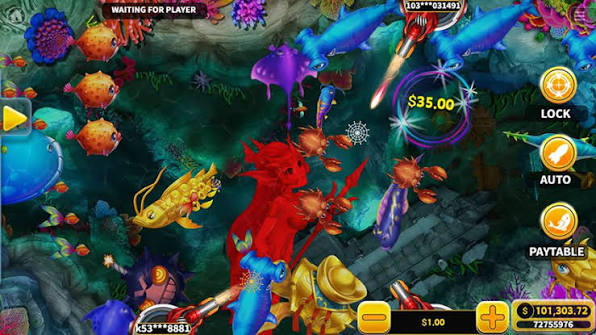
Golden Dragon is KA Gaming’s underwater fish shooter built around moving creatures, cannon fire, and special effects. A new player may notice the dragon first, but the more useful starting point is the interface: where the balance appears, what each shot costs, and how rewards are recorded.
This luckycola beginner’s guide follows a practical learning sequence, from opening the rules to understanding Freeze Bomb and Crystal Win. It focuses on reading the game correctly before deciding whether to play.
Start with the Golden Dragon Interface
The playing area contains creatures that move across the screen. Your controls determine where you aim and how you fire. Before taking a shot, locate the current stake and check whether changing rooms or cannon settings changes the amount deducted.
An animated impact is not necessarily a prize. Look for the game’s capture confirmation and credited balance change to distinguish a hit from a paid result.
| Interface Element | What to Learn |
|---|---|
| Balance | How many credits remain |
| Shot setting | The charge for each shot |
| Target chart | Which creatures correspond to which rewards |
| Rules panel | How captures and features work |
| Room selection, if offered | Whether available stakes differ |
| Sound and display settings | How to keep the action readable |
A Simple First-Session Sequence
Read Before Firing
Open the help panel and identify the unit used for the wager. A displayed credit may not be equivalent to one peso. If a service offers several currencies or virtual-credit modes, confirm which balance is active.
Choose a Setting You Understand
The best learning setting is one where the cost is easy to track. This luckycola walkthrough does not assume that every version has identical room names, limits, or buttons. Use the labels actually shown in your game.
Observe a Short Period of Play
Notice how fish enter and leave, how often you fire, and how prizes appear. Pause when you need to read an explanation. Learning the display is more useful than immediately following every large creature.
Recognize the Two Main Special Features
Freeze Bomb temporarily stops fish movement after activation. The screen may become easier to read, but a freeze does not remove the cost or uncertainty of shooting.
Crystal Win produces a chain reaction across eligible crystals. It should be understood through its own rules, including which objects count and how the award is calculated.
| Feature | Beginner’s Question | Common Misunderstanding |
|---|---|---|
| Freeze Bomb | What activates the freeze? | Frozen targets are guaranteed prizes |
| Crystal Win | Which crystals are included? | Every creature is cleared |
| Golden dragon | What does its paytable entry say? | Its arrival guarantees a win |
Track Spending with a Small Calculation
For luckycola readers, a simple calculation makes rapid-fire costs easier to understand: number of shots multiplied by cost per shot equals total shooting cost at that setting.
For example, 80 shots at an illustrative ₱0.50 each cost ₱40. Credited prizes must then be subtracted from that cost to calculate the session result. These figures explain the method and are not a statement of available Golden Dragon stakes.
If the shot setting changes, calculate each group separately. Counting only the latest stake can make earlier spending disappear from your estimate.
Golden Dragon Beginner FAQ
Can I learn in demo mode?
Where a demo is offered, it can help with controls and feature recognition. Demo access and account requirements depend on the service.
Does a larger cannon ensure a capture?
Do not assume it does. Read the relationship between cannon settings, wager size, and rewards in the rules.
When should I pause?
Pause whenever the cost, target, or credited result becomes unclear. The goal of this luckycola guide is a first session you can understand, including how much was spent and what was returned.